-
Bluelight blocking – Eye protection filter-- 2017. 10. 27. 09:12
Bluelight blocking – Eye protection filter
It is the app faithful to the blue light blocking function that protects your sight from harmful blue light.
Installation of Bluelight blocking (Play Store):
https://play.google.com/store/apps/details?id=com.bluelight.Smart
The picture above is the main screen of the app. The functions will be explained below.* Blue light blocking filter
Click the on/off function of the blue light filter to change on/off status.
* Filter transparency
It changes the transparency of the blue light filter which will change the degree of blocking the blue light.You can change the transparency by using SeekBar of the picture above and can change in a 1% unit by using
button.
If you click
, you move on to the scheduler(timer) of the picture below.
You can operate the scheduler.
You should register at least 2 schedulers since there is no meaning in having 1 schedule operate the scheduler.If you click
, a screen enabling you to register the schedule will turn up. Herein, you set the kind of filter, time, transparency, and on/off setting.
Click
to go back to the main screen.
in the picture above is the filter on/off setting in the schedule.
(The example of the above picture means the setting which turns on the filter by 30% blocking by the default filter at PM 1:41.)
* Filter (color) selection
Apply the filter of the color you want such as default filter, yellow, red, and brown.
* Icon on the status bar
Choose whether to mark the icon on your status bar.
* Autorun
Choose whether to apply the blue light filter when the smart phone is rebooted.
* To display the icon(On/Off)
When the screen of smart phone is on from the off state, the icon functioning as On/Off turns up on the screen. (in the bottom right corner of the screen)
You can move on to the position you want while pressing this icon.
Click the puppy icon beside the 'To display the icon(On/Off)'. (check the function personally^^)
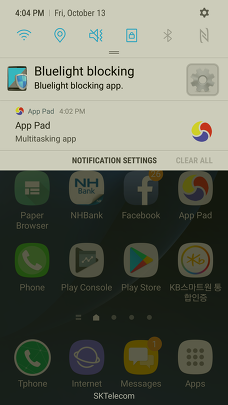
You can turn the Bluelight Blocking on or off by clicking the Bluelight blocking that can be found after lowering the status bar. You can also move onto the main screen by clicking

.
Installation of Bluelight blocking (Play Store):
https://play.google.com/store/apps/details?id=com.bluelight.Smart
'--' 카테고리의 다른 글
App Pad - Quick Launch (0) 2017.10.27 ブルーライト軽減使用説明 (0) 2017.10.26 アプリパッド使用説明 (0) 2017.10.26 Blue light blocking – Eye protection filter (0) 2017.10.13


